
How to use the GSC and GA4 Insights API
The GSC and GA4 Insights API lets you pull your Google Search Console and Google Analytics 4 data out of Sitechecker into your own tools and reports.
Both are modules inside the Sitechecker Public REST API, sharing the same key, projects, and error handling.
The value is that Sitechecker has already cleaned and joined the two sources for you.
GSC tells you how you perform in search. GA4 tells you what that traffic then does. The search to conversion endpoints bridge the two, so you can report rankings and revenue in one place.
It is built for agencies and SEO teams automating client reporting, quick win analysis, and revenue attribution.
Who can use it
Public API access is available on any plan.
You also need your API key, a project, and Google Search Console connected to it. GA4 endpoints and the search to conversion bridge also need GA4 connected.
Missing connections return GSC_NOT_CONNECTED or GA4_NOT_CONNECTED .
Setup
Authentication and project setup are the same as the rest of the Public API. Follow the getting started guide for your API key and project_id .
In short: send the key as Authorization: Bearer <your_api_key> and use the base path https://sitechecker.pro/api/v1 . You can only access your own account's projects.
Read your project's filter values first, so you pass valid countries, devices, and segments instead of guessing. Unsupported filter values are rejected, not ignored:
curl --url 'https://sitechecker.pro/api/v1/gsc_filter_values?project_id=12345' \ --header 'Authorization: Bearer <your_api_key>'
GA4 has its own ga4_filter_values .
The endpoints
Most endpoints take date_from and date_to , plus limit and offset . Filters (segment_id , country , device , keyword ) go in the query.
GSC Insights
| Area | Endpoints |
|---|---|
| Performance | gsc_performance_summary (clicks, impressions, CTR, position with diffs), gsc_performance_history , gsc_rankings_history |
| Keywords | gsc_keywords , gsc_keyword_history , gsc_new_lost_keywords |
| Pages | gsc_pages , gsc_page_history , gsc_new_lost_pages , gsc_last_found_pages , gsc_page_segments , gsc_page_segments_history |
| Breakdowns | gsc_countries , gsc_devices |
| Opportunities | gsc_cannibalization and gsc_cannibalization_pages , gsc_keyword_gap_pages and gsc_keyword_gap_page_keywords |
| Search to conversion | gsc_search_conversion_summary , gsc_search_conversion_pages , gsc_search_conversion_history |
| Filter values | gsc_filter_values |
GA4 Insights
| Area | Endpoints |
|---|---|
| Site | ga4_site_summary (sessions, users, engagement, conversions with diffs), ga4_site_history |
| Pages | ga4_pages , ga4_page_history |
| Filter values | ga4_filter_values |
Shared: projects , segments , segment_details .
Example, the GSC performance overview:
curl --url 'https://sitechecker.pro/api/v1/gsc_performance_summary?project_id=12345&date_from=2026-06-01&date_to=2026-08-31' \ --header 'Authorization: Bearer <your_api_key>'
Rules to remember
- GSC and GA4 must be connected. Without them, requests return
GSC_NOT_CONNECTEDorGA4_NOT_CONNECTED. Search to conversion needs both. - Read the dates back. The response carries the dates actually used; the window can be shorter than you requested if data is missing.
- Comparison is built in. Summary endpoints accept a comparison period and return diffs against it, so you do not compute change yourself.
- Filters are validated. Read
gsc_filter_valuesorga4_filter_valuesfirst; unsupported values are rejected, never silently ignored. - Paginate. Use
limitandoffset, and read the total from the response. - Segments scope everything. Pass
segment_idto focus any report on the pages that matter.
Use cases: how agencies use it
-
White label GSC and GA4 reporting.
Pull
gsc_performance_summary,ga4_site_summary, and top keywords and pages on a schedule into branded reports. One API replaces manual exports from two Google tools, and no per seat fees means you can cover every client. -
AI written performance commentary.
Pipe the JSON into an AI assistant (for example Claude) to explain why clicks or traffic moved and draft client ready notes.
-
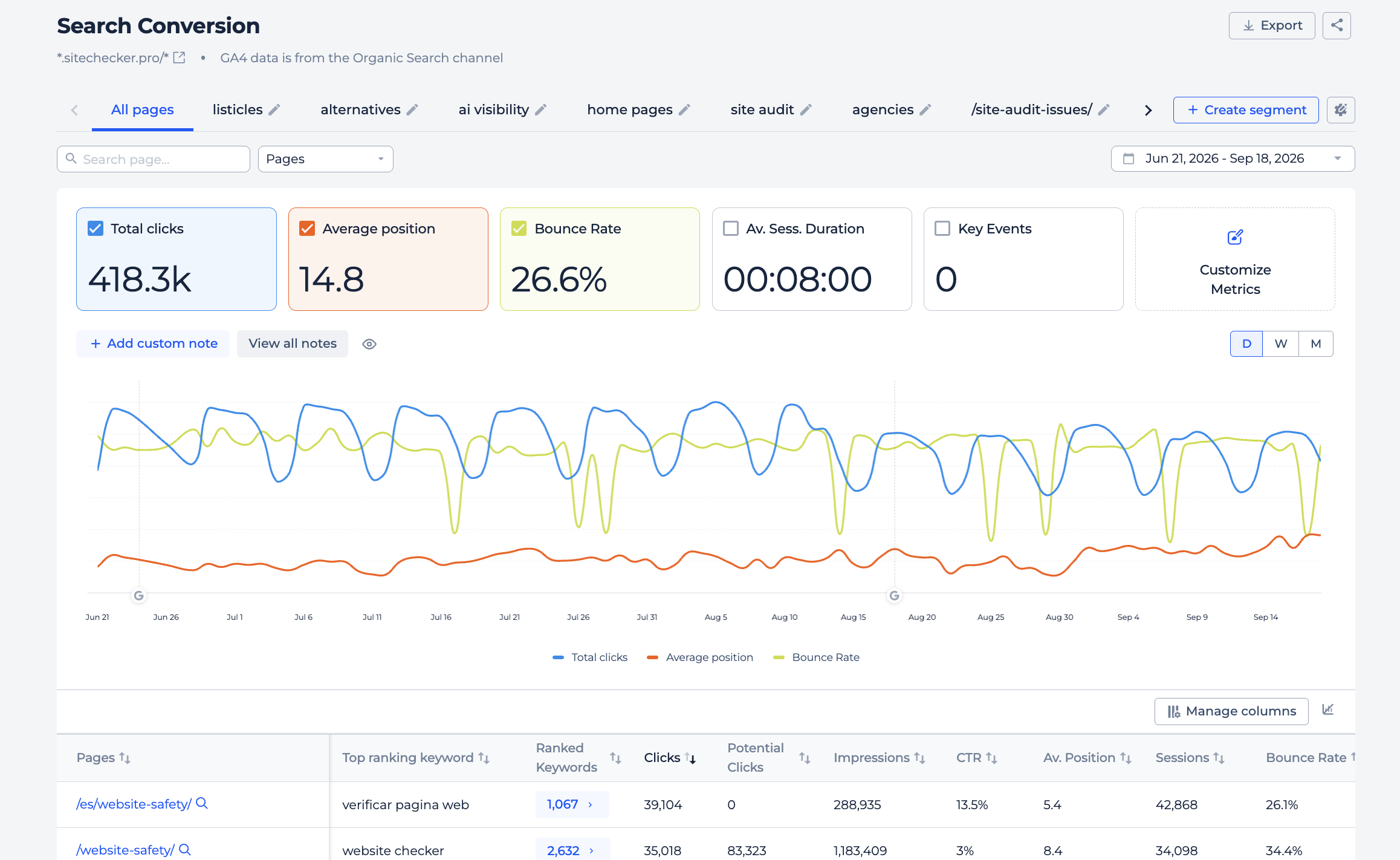
Search to conversion, the revenue story.
gsc_search_conversion_summaryandgsc_search_conversion_pagestie rankings to GA4 outcomes, so clients see which search traffic actually converts, not just impressions.
search conversion api -
Quick wins with keyword gaps.
gsc_keyword_gap_pagessurfaces pages a few positions from breaking through; drill in withgsc_keyword_gap_page_keywordsfor the exact terms to optimize.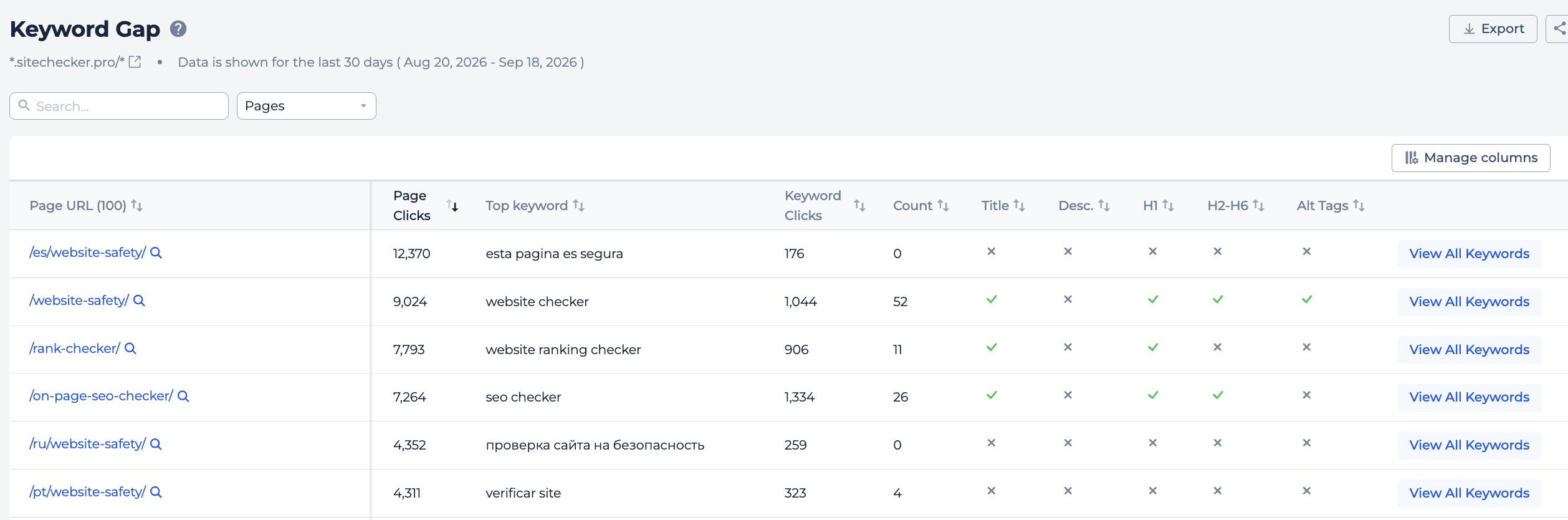
-
Fix cannibalization.
gsc_cannibalizationfinds queries where several of a client's pages compete, andgsc_cannibalization_pagesshows which ones, so you can consolidate.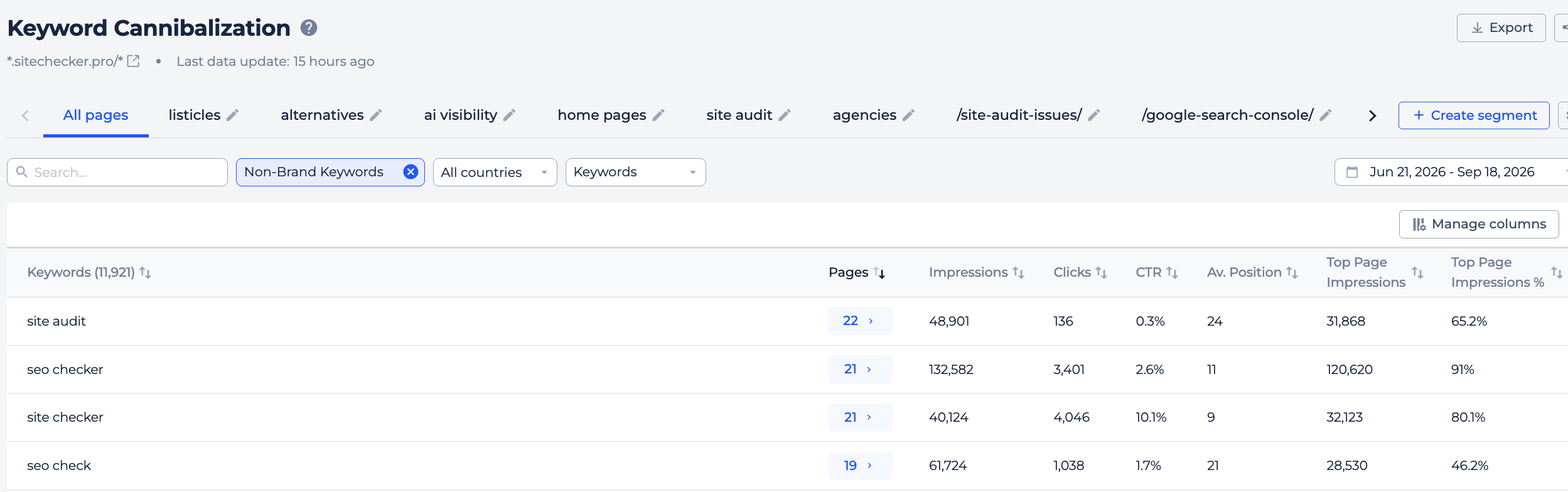
-
Won and lost tracking with alerts.
gsc_new_lost_keywordsandgsc_new_lost_pagesreport movement over the period and drive drop alerts to Slack or email.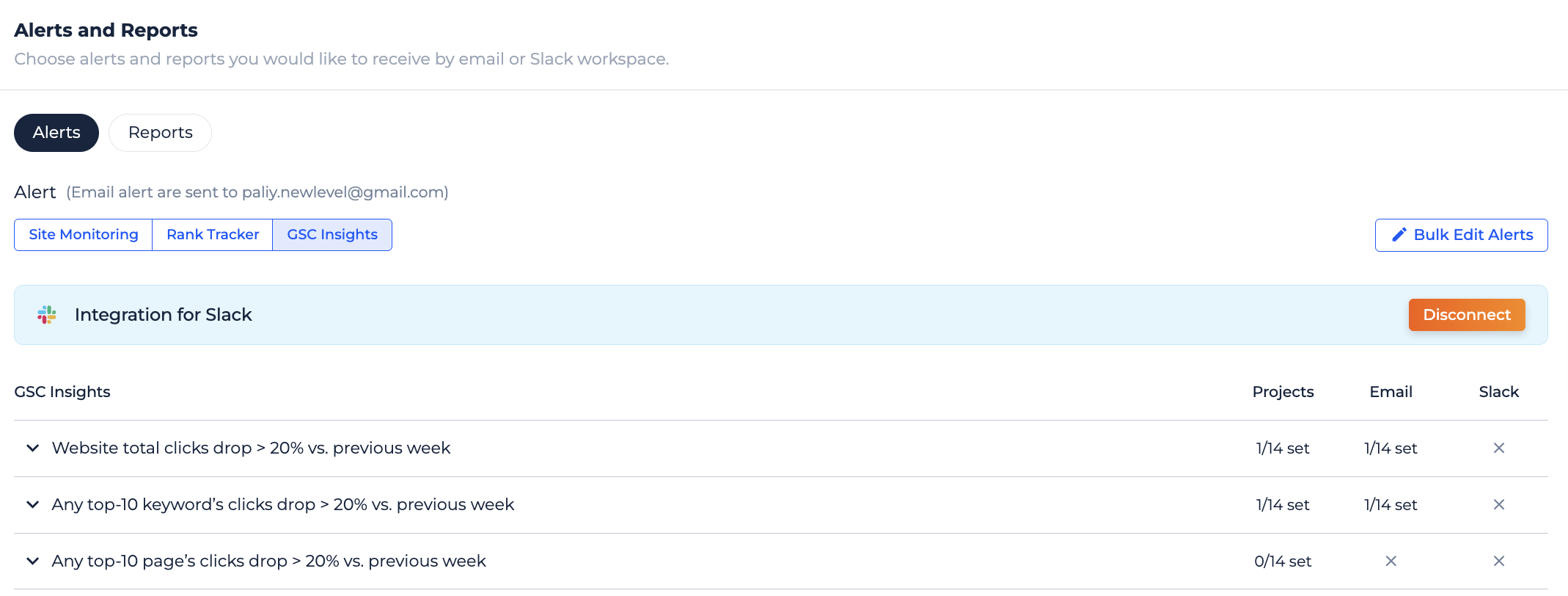
-
Segment and breakdown reporting.
Report by
gsc_page_segmentsfor money pages versus blog, or bygsc_countriesandgsc_devicesfor local and mobile-first clients.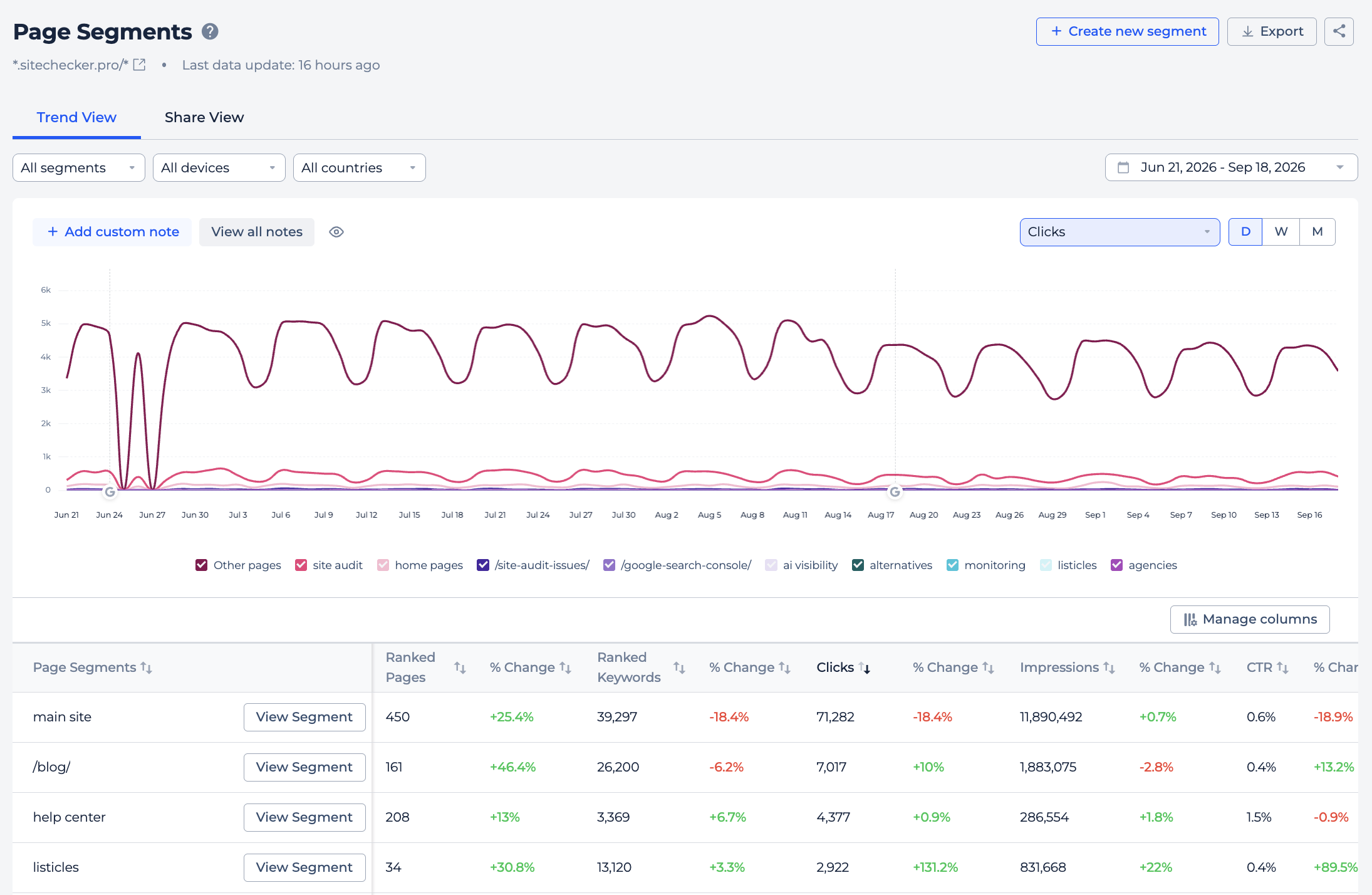
- Custom dashboards and BI. Feed clean, pre joined JSON into Looker Studio, a client portal, or a spreadsheet, and refresh it automatically.
Common errors
INVALID_API_KEY / REVOKED_API_KEY (bad or revoked key), MISSING_PUBLIC_API_ACCESS (no entitlement, check plan), ACCESS_DENIED (project belongs to another account), PROJECT_NOT_FOUND , GSC_NOT_CONNECTED / GA4_NOT_CONNECTED (connect the source in the project), INVALID_FILTER (unsupported filter, recheck against filter values), RATE_LIMIT_EXCEEDED (slow down and retry).
FAQ
What is it used for?
Programmatic access to your Search Console and GA4 data, already cleaned and joined, for reports, dashboards, quick win analysis, and revenue attribution.
How do I authenticate and get my project ID?
Bearer token in the Authorization header plus a project_id , both covered in the getting started guide.
Do I need both GSC and GA4 connected?
GSC endpoints need Search Console. GA4 endpoints and the search to conversion bridge also need GA4. Each returns a clear error if its source is missing.
Can I compare two periods?
Yes, summary endpoints accept a comparison period and return diffs against it.
Need help?
Questions? Reach us at support@sitechecker.pro, or see the API documentation. Happy reporting!