
How to use New & Lost Pages report in GSC Insights
The New & Lost Pages report in Sitechecker GSC Insights shows which pages started to appear in Google and which pages stopped getting search traffic.
It compares two periods and shows what you gained and what you lost.
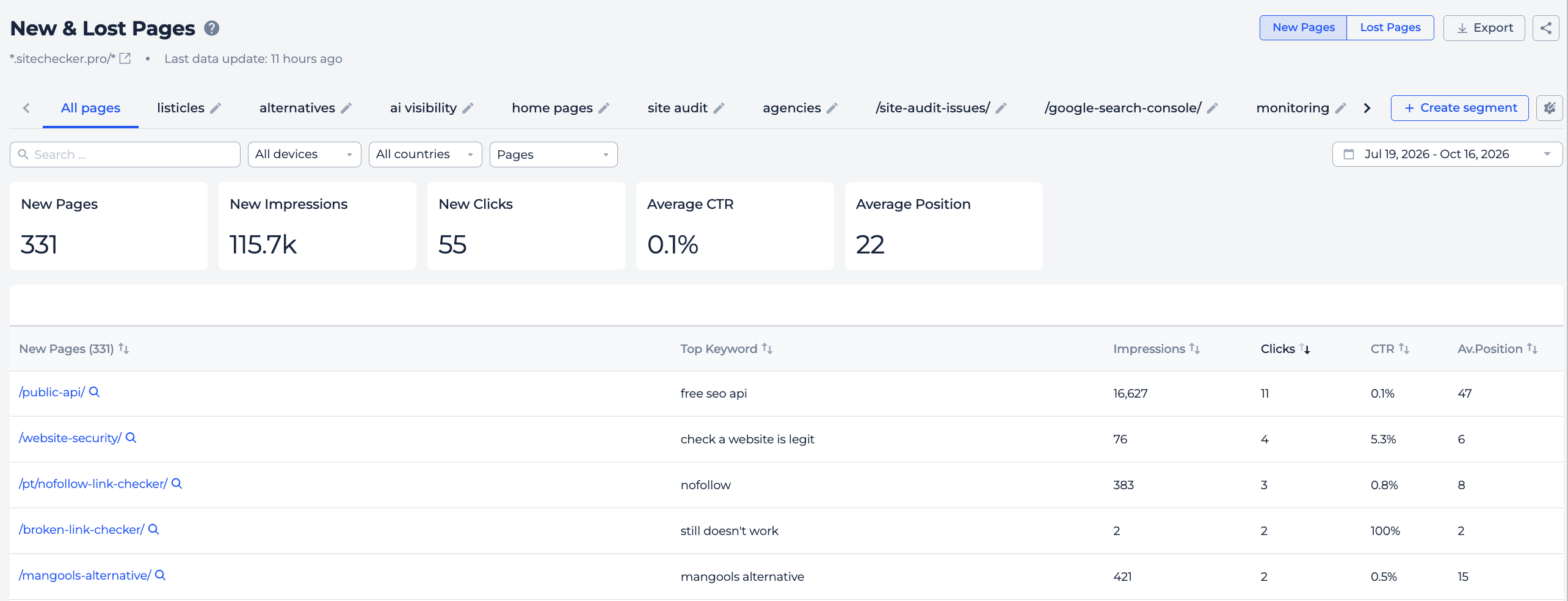
What you can do with New & Lost Pages
- See pages that started to get impressions or clicks.
- See pages that lost all their search traffic.
- Check the total clicks, impressions, CTR and position of new or lost pages.
- See the top query for each page.
- Open Page Details for any page.
How it works
Sitechecker compares the period you choose with the previous period of the same length.
- New pages have search data in the current period, but had none in the previous one.
- Lost pages had search data in the previous period, but have none now or all their metrics are zero.
Tabs and summary
The report has two tabs: New Pages, which opens by default, and Lost Pages.
Above the table, you see the number of pages and their total impressions and clicks, average position and CTR. On the Lost Pages tab, these values are shown as negative numbers, because this is traffic you lost.
Table
New pages are sorted by clicks. Lost pages are sorted by the clicks they lost.
For each page you see its search metrics and its top query. Click the magnifier icon to open Page Details.
Filters
Use the date picker to choose the period. You can search pages and filter by Pages, Devices and Countries.
How to use it in practice
- Check the Lost Pages tab after a site update or migration. Lost pages with many clicks are the first ones to fix.
- Open Page Details for a lost page and check its status code, redirects, canonical and noindex.
- Use the New Pages tab to see whether your new content starts to rank and which queries bring it traffic.
Frequently asked questions
What is a new page in this report? A page that has search data in the current period but had none in the previous one.
What is a lost page? A page that had search data in the previous period but has none or only zero metrics now.
Why are lost values negative? They show the traffic you lost compared with the previous period.
Is there a version for keywords? Yes. The New & Lost Keywords report shows the same data by keyword.
Need help?
If you have questions about the New & Lost Pages report, write to us at support@sitechecker.pro. We are happy to help.